
How to Choose Electrical Estimating Software in 2026
Choosing electrical estimating software is one of the most consequential operational decisions an electrical contractor will make. The right system helps reduce mistakes during estimating while shaping how accurately you bid, how quickly your team works, how consistently new estimators are trained, and ultimately how profitable your projects are.
Yet many buyers evaluate electrical estimating software the wrong way: they assume estimating systems are essentially equal, compare them primarily by price, and choose the lowest-cost option. Electricians already know that when it comes to the tools they depend on every day, quality, reliability, and fit matter more than simply buying the cheapest option. Estimating software should be evaluated the same way.
The best electrical estimating software is not simply the lowest-priced product or the one with the longest feature list. It is the product that fits your type of work, your estimating process, your team size, your pricing sources, and your business requirements. It should also be able to grow with your company, so expanding into larger projects, new markets, or a bigger estimating team does not force you to replace the system you have already invested in.
This guide walks through the criteria that matter most in 2026, so you can define your requirements before you schedule a single demonstration, and evaluate every option against the way your company actually estimates.
Electrical Estimating Software
Put IntelliBid Against Your Own Criteria
Bring your requirements to a working demo. Run a real estimate, test the integrations you depend on, and see how IntelliBid handles the way your company actually bids.
Start With Software Built for Electrical Estimating
Electrical estimating software should be built around the way electrical contractors estimate work. A generic construction estimator or a spreadsheet cannot provide the labor units, materials, assemblies, job breakdowns, and pricing tools that electrical construction demands.
At a minimum, look for software that includes:
- An established, electrical-specific material database
- Prebuilt electrical assemblies
- Labor units appropriate for electrical installations
- Materials and assemblies for your particular type of work
- Support for commercial, industrial, residential, low-voltage, datacom, solar, or service work as applicable
Verify that the database actually contains the materials and assemblies you use every day. A large database is not helpful if it does not reflect your real-world scope. Purpose-built electrical contractor estimating software platforms such as IntelliBid are designed specifically for electrical, low-voltage, datacom, and solar contractors, rather than adapted from generic construction tools.
Evaluate the Material and Assembly Database by Depth and Flexibility
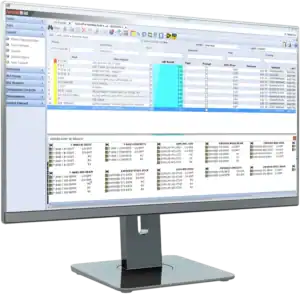
Inventory management software interface by Conest Software Systems on a computer monitor.
A strong database saves enormous setup time and helps estimators work more consistently. But depth alone is not enough; flexibility is what protects you as your business changes.
Look for the ability to:
- Use prebuilt assemblies for common electrical installations
- Create new items and assemblies
- Edit existing assemblies
- Customize materials, labor units, descriptions, and pricing
- Permanently update a component used across many assemblies at once
Here is a real test: an estimator should be able to find a material used in dozens of assemblies and replace it everywhere in a single action. This matters when products, company standards, suppliers, or installation methods change. IntelliBid ships with an industry-leading database of more than 140,000 items and 500,000-plus prebuilt, NEC and real-world based assemblies that you can modify to match how your company builds.
The IntelliBid Database, by the Numbers
- 140,000+Electrical Database Items
- 500,000+Prebuilt NEC-Based Assemblies
- 4Pricing Service Integrations
- 1989Serving Electrical Contractors Since
Every assembly is editable, so the database is a starting point rather than a constraint.
Confirm That Labor Can Be Adjusted for Installation Difficulty
Base labor units never account for every field condition. The software must make it easy to adjust labor for installations that are harder or slower than normal.
Common conditions that change labor include:
- Work performed high above the floor or ground
- Congested work areas and restricted access
- Occupied or operational buildings
- Unusual mounting heights
- Renovation and retrofit work
- Night, weekend, or phased work
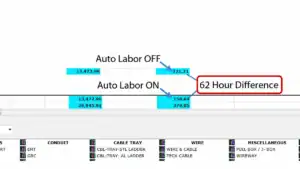
IntelliBid Automatic Labor Factoring Screenshot
Just as important, the software should show how the final labor total was calculated so estimators can understand and defend it. IntelliBid applies Automatic Labor Factoring for conditions like height, floor level, and run length, and lets estimators tune labor at the item or assembly level rather than guessing with broad percentage adders.
Review Pricing and Supplier Integration
Material prices change constantly, so estimators need a dependable way to keep costs current without endless manual entry.
The software should be able to:
- Connect with your preferred electrical pricing service
- Import pricing from a distributor or supply house
- Update prices without extensive manual keying
- Preserve company-specific pricing when needed
- Let estimators review and override imported prices
- Document when pricing was last updated
Ask exactly which pricing services and suppliers are supported, and whether integrations cost extra. IntelliBid integrates with NetPricer, EPIC, TRA-SER, and TRASER CX for Australian customers, supports spreadsheet imports, and stores multiple vendor prices per item so you can run best-buy comparisons across your local suppliers.
Insist on a Customizable Process and Strong Editing Tools
Every electrical contractor estimates a little differently. The software should adapt to your company, not force your company to abandon a process that works.
These areas should be customizable without paying for programming every time you need a change:
- Items, materials, assemblies, and labor units
- Bid forms, job structure, and estimate breakdowns
- Overhead and profit calculations
- Bid reports, proposal formats, and the overall bid workflow
Equally important, the software should make mistakes easy to catch and correct before a bid goes out. Strong editing tools let you:
- Search for an item anywhere in an estimate
- Replace an item throughout the entire job
- Edit quantities, labor, prices, or descriptions
- Review changes before they are finalized
- Flag missing information or unusual values
- Maintain an audit trail of important changes
If an estimator discovers the wrong conduit, fitting, fixture, or cable was used across a job, the software should replace it everywhere at once, not one line at a time. IntelliBid’s Find/Replace, Audit Trail, Smart Substitution, and missing-price and missing-labor alerts are built for exactly this kind of correction.
Check Job Organization, Breakdown, and Bid Deadlines
As your estimating history grows, finding and structuring jobs becomes a productivity issue in its own right.
Good job organization lets you locate any estimate quickly. The software should allow users to:
- Sort jobs by customer, estimator, status, date, project type, or location
- Filter the job list and search by job name, number, customer, or contractor
- Separate active, completed, awarded, lost, and archived bids
- Quickly reopen previous estimates for reference
Large estimates also need to be broken into meaningful stages so you can review, assign, compare, and report on them. Look for the ability to divide a job by building, floor, area, phase, system, bid item, cost code, alternate, change order, or construction stage. IntelliBid’s Phase Tree does exactly this, and a clear breakdown makes handoff to project management and accounting far cleaner.
Finally, missing a bid deadline loses the opportunity no matter how accurate the estimate is. Good electrical bidding software should record bid due dates and times, warn users as deadlines approach, sort estimates by due date, flag overdue or incomplete bids, show who owns each estimate, and track status from opportunity through submission. Notifications should be useful without becoming so frequent that users tune them out.
Support Team Collaboration and User Permissions

For larger contractors and time-sensitive projects, more than one person may need to work on the same estimate.
The software should support:
- Multiple users working in the same job
- Controls that prevent users from overwriting one another’s work
- Assignment of different job areas or stages
- Visibility into who made changes
- Shared access to current estimate information
Ask whether simultaneous estimating is truly supported, or whether users must take turns opening the job.
Security and permissions deserve the same scrutiny, because not every employee should be able to do everything. Administrators should be able to control who can open specific estimates, edit jobs, change labor units, modify the database, update pricing, change company settings, access maintenance functions, view sensitive cost and profit data, and approve or finalize bids. IntelliBid supports multiple estimators in a shared job with role-based user access that protects the integrity of your database.
Reuse Proven Work With Templates
Electrical contractors bid similar projects again and again. The software should let you reuse proven work instead of rebuilding every estimate from scratch.
Valuable reuse capabilities include:
- Creating template jobs
- Copying previous estimates
- Saving standard project structures
- Reusing assemblies and typical installation methods
- Updating a copied job without changing the original
- Building templates for different customers, markets, or project types
Templates improve speed and consistency, but estimators should still review quantities, prices, labor conditions, and scope on every new job. IntelliBid supports template jobs, Save Job As, and bid templates so repeat work like big-box stores, apartments, and schools starts most of the way finished.
Examine Reporting, Exports, and Business Integrations
Estimate information rarely stays inside the estimating tool. Contractors constantly move data into spreadsheets, accounting, and project management systems.
The software should provide clean, structured exports for:
- Material lists and labor summaries
- Job breakdowns and cost summaries
- Vendor quote comparisons and bid recaps
- Purchasing and project-handoff information
- Custom analysis
Exports should be organized and usable, not a wall of unstructured data. Beyond exports, consider whether estimating can exchange information with digital takeoff software, accounting systems, project management and purchasing tools, CRM, supplier and distributor systems, document management, and business-intelligence platforms. Verify exactly what information moves between systems rather than trusting a checkbox. IntelliBid exports to Excel and popular accounting packages, pairs with SureCount for digital takeoff, and feeds Conest Connect for dashboards and business intelligence.
Want takeoff and estimating to share the same data?
Evaluate Support, Training, and Ease of Use
Features have limited value if your team cannot get help or cannot use the software day to day.
When evaluating support and training, ask:
- Can you reach a real support person, and is same-day help normally available?
- What are the support hours and channels (phone, email, chat, remote)?
- How experienced is the support team?
- Is onboarding, implementation, and classroom, online, or recorded training available?
- Are there searchable help and knowledge resources, and do support and training cost extra?
Ask to speak with existing customers about how responsive support really is.
Ease of use matters just as much. Powerful software still has to be practical, so during a demo or trial have your own estimators perform realistic tasks: create a job, add an assembly, change an item, apply a labor adjustment, update pricing, find and replace an item, copy a previous estimate, produce a bid summary, export to a spreadsheet, and restrict a user from changing the database. A polished sales demo is not enough; the people who will use the software should test the real workflow. Conest backs IntelliBid with a US-based support team and multiple training options, including live and recorded sessions.
Quality Support is Key
Conest backs IntelliBid with a US-based support team and multiple training formats, including live classroom sessions, online instruction, and recorded training your estimators can revisit.
Look Past the Sticker Price to Total Cost of Ownership
Purchase price is only one part of the cost. The least expensive product can cost more over time if it demands heavy manual work or constant outside help.
Account for the full picture:
- Initial software cost, subscription, and user license fees
- Database and pricing-service fees
- Supplier integration fees
- Training, implementation, and support costs
- Upgrade costs and cloud hosting or storage fees
- The internal time required to set up and maintain the system
Weigh deployment flexibility here too. Software available both on-premises and in the cloud, like IntelliBid on the CE Cloud platform, lets you choose the model that fits your infrastructure and budget instead of forcing one path.
Protect Your Data: Ownership and Portability
Before you commit, understand what happens to your estimating data if you ever change systems.
Ask directly:
- Who owns the estimate and customer data?
- Can the company export its information, and in which formats?
- Can material databases, assemblies, and job history be exported?
- Is there a cost to retrieve your data, and what happens when a subscription ends?
- How is data backed up and protected?
Evaluate New AI Capabilities Carefully
In 2026, nearly every product advertises artificial intelligence features. Focus on practical results, not marketing claims.
Genuinely useful AI-assisted capabilities may include:
- Finding information within an estimate
- Suggesting assemblies or materials
- Identifying unusual quantities or costs
- Comparing or summarizing estimates and bids
- Assisting with takeoff
- Searching help and training information
- Identifying missing scope or potential risks
AI should assist the estimator, not make unexplained decisions. Insist that users can review, verify, edit, and approve any AI-generated recommendation. Conest is actively investing in modern AI across its estimating ecosystem while keeping the estimator in control of every number.
Test It With the People Who Will Use It
A polished sales demo is not enough. Put your own estimators in front of IntelliBid and have them run the tasks they do every day.
Build a Scorecard Before You Decide
Do not rely on impressions. Build a weighted scorecard based on your company’s actual priorities, then test every product with the same sample estimate and score it with the people who will use it every day. For a condensed checklist to start from, see what to look for in electrical estimating software.
- Define RequirementsWrite down what your company needs before any demo is scheduled.
- Test Real TasksHave your estimators run the same sample estimate in every product.
- Verify IntegrationsConfirm exactly what data moves to pricing, takeoff, and accounting.
- Check SupportTalk to support staff and current customers, not only to sales.
- Compare Total CostScore each option on cost of ownership, not the sticker price.
| Evaluation category | Your weight (1-5) | Vendor A | Vendor B | Vendor C |
|---|---|---|---|---|
| Electrical database quality | ||||
| Assembly capabilities | ||||
| Labor adjustment tools | ||||
| Pricing integrations | ||||
| Ease of use | ||||
| Customization | ||||
| Collaboration | ||||
| User permissions | ||||
| Job organization | ||||
| Reporting | ||||
| Spreadsheet exports | ||||
| Support | ||||
| Training | ||||
| Integrations | ||||
| Data ownership | ||||
| AI capabilities | ||||
| Total cost of ownership |
Multiply each product’s score by your weight for that category, then compare totals. The exercise forces you to define what matters before a sales conversation can define it for you.
The Bottom Line: Fit Beats Feature Count
Choosing electrical estimating software is a long-term operational decision, not a one-time purchase. The right system helps you estimate more accurately, work more efficiently, standardize company procedures, train new estimators, keep pricing current, protect company data, and hit every bid deadline.
Define your requirements before you schedule demonstrations. Test realistic estimating tasks, verify the integrations you depend on, talk to support personnel and current customers, review the complete cost of ownership, and involve both management and day-to-day users in the final decision.
For electrical, low-voltage, datacom, and solar contractors who want electrical estimating software built for this exact process, IntelliBid pairs an industry-leading database, precise labor control, deep customization, and an integrated takeoff and reporting ecosystem, backed by decades of estimating expertise from Conest Software Systems.
Measured Against This Guide
IntelliBid at a Glance
- Built For
- Electrical, low-voltage, datacom, and solar contractors
- Database
- 140,000+ items and 500,000+ prebuilt NEC and real-world assemblies, all editable
- Labor Control
- Automatic Labor Factoring for height, floor level, and run length, tunable per item or assembly
- Pricing
- NetPricer, EPIC, TRA-SER, and TRA-SER CX, plus spreadsheet import and multiple vendor prices per item
- Editing Tools
- Find/Replace, Audit Trail, Smart Substitution, and missing-price and missing-labor alerts
- Job Structure
- Phase Tree breakdown by building, floor, area, phase, system, or stage
- Collaboration
- Multiple estimators in a shared job with role-based user access
- Integrations
- Excel and accounting exports, SureCount takeoff, Conest Connect reporting
- Deployment
- On-premises or hosted on CE Cloud
- Support
- US-based team with live, online, and recorded training
Electrical Estimating Software: Frequently Asked Questions
Electrical estimating software is a tool built specifically for electrical contractors to prepare accurate project bids. It combines an electrical material database, prebuilt assemblies, labor units, takeoff tools, pricing integration, and bid reporting so estimators can produce consistent, competitive estimates faster than by hand. Learn more in our electrical estimating software overview.
General construction or spreadsheet tools lack the electrical-specific material database, code-based assemblies, and installation labor units that electrical work requires. Electrical estimating software is designed around how electricians actually build, which produces more accurate labor and material totals.
Prioritize fit over feature count: an electrical-specific database, flexible assemblies, adjustable labor for installation difficulty, reliable pricing integration, a customizable workflow, strong editing tools, collaboration and permissions, clear reporting and exports, responsive support, transparent total cost of ownership, data portability, and practical AI. Score each product against your own priorities.
Cost varies by edition, number of users, and add-ons. Look beyond the sticker price to subscription or license fees, database and pricing-service fees, training, implementation, support, upgrades, cloud hosting, and the internal time to set up and maintain the system.
With the right software, yes. Look for genuine simultaneous multi-user editing with controls that prevent estimators from overwriting one another’s work, plus role-based permissions. Confirm whether the product truly supports concurrent editing or requires users to take turns.
Neither is universally better. Cloud deployment adds flexibility and reduces local IT overhead, while on-premises gives you direct control of your environment. The best choice depends on your infrastructure, security requirements, and budget, which is why software that offers both models is ideal.
Ready to Evaluate IntelliBid?
You already have the criteria. The next step is putting a real product against them with the people who will use it every day.
See IntelliBid in Action
Bring your own estimate and your own requirements to a working demo.
Compare the Full Feature Set
Review IntelliBid’s database, labor control, customization, and reporting in detail.